G502 Hero Honest Review — Is the Hype Justified?
I've been using the Logitech G502 Hero as my daily driver and main gaming mouse for several months. I bought it because of the rave reviews I'd seen and because I wanted a versatile mouse that could handle both fast-paced shooters and long creative sessions. After dozens of hours in competitive games, photo editing, and general office work, I have a pretty clear picture of what this mouse does well and where it falls short. In this review I’ll walk through my hands-on experience, show what I appreciated, point out genuine annoyances I encountered, compare it to a couple of close alternatives, and share a practical buying guide so you can decide whether the hype is justified for you.
Quick overview — what the G502 Hero is
The G502 Hero is a wired gaming mouse from Logitech that uses the HERO optical sensor. It targets gamers who want lots of customizable buttons, an adjustable weight system, and a precise sensor for tracking. In my experience it’s a feature-rich mouse with a distinct sculpted shape and a mechanical profile that suits palm-to-claw grips. It’s marketed as an all-rounder — capable of competitive FPS play but also comfortable for long sessions at the desk.
What I tested and how
To evaluate the mouse realistically I used it across several scenarios:
- Competitive FPS: regular play sessions in Valorant and a few quick matches in CS:GO to test tracking, click latency, and ergonomics under fast aim corrections.
- MMO/Action-RPG: several hours in an action-RPG to test macro flexibility and the usefulness of extra side buttons.
- Productivity: Photoshop and Excel work for long-form editing and repetitive tasks to test comfort and button remapping usefulness.
- Daily browsing and general use to gauge the scroll wheel behavior and daily comfort.
Design and ergonomics — first impressions
Out of the box, the G502 Hero feels solid. The build doesn't scream featherweight, and that’s deliberate — it’s meant to feel substantial. The mouse has a sculpted right-hand centric shape with an elevated hump toward the rear, which suits my palm grip best. If you use a fingertip grip exclusively, you may find it a bit large; in my case I alternate between palm and claw and the contour supports both without forcing my hand into an awkward angle.
One feature I immediately appreciated was the textured thumb rest and the placement of the primary side buttons. The thumb buttons are easy to reach without twisting my hand, and the DPI-shift button sits where my thumb naturally rests when I want to momentarily lower DPI for precision shots. The primary left and right clicks are crisp and responsive — they have a reassuring mechanical feel that I liked for fast clicking sequences.
My main gripe with the design is that the matte finish on the side grips shows oil and discoloration after a few days of heavy use. It doesn’t affect function, but it’s something I noticed and cleaned more often than I'd like. Also, the cable is braided and durable, but it can feel a little stiff compared to modern paracord-style cables; I found it helpful to add a light bungee or position the mouse to avoid cable drag.
Sensors, tracking, and performance
The G502 Hero uses Logitech’s HERO optical sensor (HERO 16K in many versions). In my tests, the tracking was precise and consistent. Flicks and micro-adjustments registered exactly as I intended across dozens of matches in Valorant. I didn’t experience jitter or unexpected acceleration, and the lift-off distance is low enough not to interfere when I reposition my hand mid-match.
One subtle observation: at extremely low DPI values with large in-game mouse acceleration settings (uncommon for most users), I noticed a very slight smoothing effect compared to some ultra-lightweight esports mice. For standard DPI ranges (400–3200), the G502 felt rock solid and predictable. In short, for 95% of users — including most competitive players — the sensor is more than sufficient.
Buttons, scroll wheel, and customization
Where the G502 really stands out is in customization. It has a generous number of programmable buttons (eleven on the model I used), a dual-mode scroll wheel with a mechanical ratchet and a hyper-fast free-spin, and onboard memory profiles so you can store settings without the software running.
Discover deals on Electronics — updated daily.
View Offers →I used the additional side buttons for weapon binds in shooters and tool shortcuts in Photoshop. What I found was that those extra controls can actually make you more efficient, once you spend time mapping them thoughtfully. The DPI shift button is a real win for me — it’s easy to hit with my thumb and gives a consistent, temporary precision mode that helped land long-range shots.
The scroll wheel is a mixed bag. I love the mechanical ratchet for stable scrolling through long documents and the free-spin mode when I want to zip through pages. However, the switch between modes is mechanical and a little noisy; in quiet environments the click when toggling is audible. Also, the hyper-fast scrolling mode is fantastic for web browsing but can be a little too loose for precise incremental scrolling when I forget to switch back.
Software: Logitech G HUB experience
I ran the mouse through Logitech G HUB to set DPI stages, remap buttons, and control lighting. The software gives deep control over polling rates, DPI steps, macros, and lighting zones. In my experience it does what it promises, but it’s not without friction. G HUB is powerful but also heavier than minimalist configuration tools — it felt sluggish on an older laptop, and the UI sometimes required hunting through nested menus to find specific settings.
That said, once you set up your profiles and save them to the mouse, you can use the device on other systems without running the software. I liked having that portability for LAN nights or when borrowing a different PC.
Weight tuning and comfort for long sessions
The G502 includes removable weights, which I used to dial in the feel. I started without any additional weight and then added one or two to see what felt best. For long editing sessions, the added heft made dragging feel more controlled; for high-speed twitch aiming I removed a few grams to speed up flicks. The ability to tune weight is a practical advantage and not just a marketing checkbox — it changed my experience noticeably depending on the task.
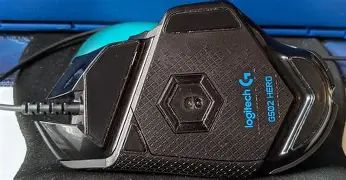
After several-hour sessions, my hand did not cramp, and the wrist fatigue was within what I’d expect for any mid-sized mouse. I do think that very small-handed users might find the G502 too tall, and very light-handed players might prefer a lighter, esports-focused mouse.
Longevity and reliability
After months of daily use, the G502 held up well. Button wear was minimal, and the scroll wheel mechanism remained consistent. The braided cable showed no fraying. As with many mice, the main signs of use were cosmetic — shiny spots where my palm rested and some dirt buildup in crevices. Functionally I had no failures or need for warranty service during my testing period.
Pros & Cons
- Pros:
- Highly customizable with many programmable buttons and onboard profile storage
- Excellent tracking with Logitech HERO sensor for consistent performance
- Adjustable weight system that meaningfully changes the feel
- Comfortable ergonomic shape for palm and claw grips
- Dual-mode scroll wheel (ratchet + free-spin) is versatile
- Cons:
- Relatively heavy out of the box for players who prefer ultralight mice
- Cable can feel stiff and may benefit from a bungee
- Matte finish shows oils and requires regular cleaning
- Logitech G HUB is powerful but can feel bloated or slow on older PCs
- Scroll wheel mode switch is a bit noisy
Comparison: G502 Hero vs similar mice
| Feature | G502 Hero (wired) | G502 Lightspeed (wireless) | Razer DeathAdder V2 (wired) |
|---|---|---|---|
| Sensor | HERO optical sensor (high precision) | HERO sensor, Lightspeed wireless tech | Focus+ optical sensor |
| Buttons | Multiple programmable buttons (≈11) | Multiple programmable buttons (≈11) | Fewer extra buttons (simpler layout) |
| Weight tuning | Removable weights | Typically lighter, some versions lack weights | No weight tuning, lightweight design |
| Best for | Players who want customization and macros | Users wanting wireless without compromising features | Players who prefer simple, ergonomic, esports-ready mouse |
| Price point | Mid-range (value for feature set) | Higher (wireless premium) | Mid to high depending on edition |
| Personal take (my use) | Balanced choice — great for both gaming and productivity | Attractive if you want no-cable freedom, but I stuck with wired | Better if you want minimalism and lighter weight |
Buying guide — is the G502 Hero right for you?
If you're considering the G502 Hero, ask yourself the following questions based on what I found during months of use:
1. What is your grip style?
If you use a palm or hybrid palm/claw grip, you’ll likely find the G502 comfortable. I found it too bulky for a strict fingertip grip. Measure or estimate your hand size and compare it to typical manufacturers' fit recommendations if you can.
Find top-rated Electronics products at great prices.
Shop Amazon →2. Do you want lots of programmable buttons?
I found the extra buttons genuinely useful for both games and productivity. If you like remapping macros or having quick-access binds, the G502’s button array is a real advantage. If you prefer simplicity, a mouse with fewer buttons will be lighter and cleaner.
3. How important is weight tuning?
Weight tuning made a tangible difference for me depending on the activity. If you like to experiment with feel, the removable weights are a strong plus. If you’re after the lightest possible mouse, look elsewhere.
4. Are you okay with a wired mouse?
I stuck with wired for zero latency and no battery concerns. The braided cable is durable, but if you dislike any cable drag you’ll want a bungee or a wireless option instead (e.g., G502 Lightspeed).
5. Will you use the software?
G HUB unlocks the mouse’s potential, but it takes time to learn. If you don’t want to install configuration software, you can still use the mouse with default settings, but you’ll lose much of the customization advantage.
Who should buy the G502 Hero
- Gamers who want a versatile mouse that performs well in both competitive shooters and MMOs.
- Creators who benefit from extra programmable buttons for software shortcuts.
- Users who appreciate hardware customization like weight tuning and onboard profiles.
Who might want to look elsewhere
- Users who prioritize the lightest possible mouse for ultra-fast flicks.
- Strict fingertip-grip users with small hands — the shape may feel oversized.
- Anyone who wants a zero-maintenance matte finish — the G502 shows oils and requires occasional cleaning.
Final thoughts — is the hype justified?
After several months with the G502 Hero, I can say the hype is largely justified, but with nuance. What I appreciated most was its versatility: the tracking is dependable, the programmable buttons and DPI-shift genuinely improved my workflows and aim control, and the weight tuning allowed me to adapt the mouse to different tasks. For someone who wants a single mouse to cover gaming and productivity, the G502 does that job very well.
That said, it's not perfect. The feel is heavier than some modern esports mice, the cable could be more flexible, and the matte surfaces require upkeep. Logitech G HUB gives you power at the cost of extra software complexity. These are real trade-offs; none of them are deal-breakers for me, but they might matter to you depending on your priorities.
In my experience, if you value customization, a comfortable sculpted shape, and precise tracking, the G502 Hero delivers real-world value and justifies most of the hype. If your priorities are absolute minimum weight or the cleanest, no-maintenance finish, you might prefer an alternative. For my daily routine of competitive gaming and creative work, the G502 Hero has been a reliable, adaptable companion.