Should You Buy the K2 Version 2 in 2026? A Deep Dive
I've been using the K2 Version 2 as my daily driver for several months now, and after typing on it, gaming on it, traveling with it, and doing the routine maintenance most keyboard owners eventually face, I wanted to share a thorough, honest take. In this article I walk through what I liked, what frustrated me, and whether the K2 V2 still makes sense to buy in 2026.
Introduction: my experience and setup
To be upfront: I bought a hot-swap K2 Version 2 with tactile switches and RGB backlighting. My typical use is a mix of 4–6 hours of writing and research per day, plus a couple of hours of gaming a few times a week. I pair the board with a laptop via Bluetooth and use the USB-C cable when I want lower latency for competitive play. Over the past six months I've tried a couple of different switch types, lubed the stabilizers, and swapped keycaps once.
What I found was a keyboard that feels like a careful refinement of the original K2 rather than a radical reinvention. It addresses a number of nitpicky complaints I—and a lot of people in mechanical keyboard communities—had with the earlier model, but it also introduced a few trade-offs. Below I break down build and feel, connectivity and battery life, software and customization, sound profile, and real-world durability.
Detailed product review and analysis
Design and build quality
Out of the box the K2 V2 struck me as solid without feeling heavy-handed. The case has a more finished look compared with the original K2 I owned years ago—the edges are cleaner, and the mounting feels a touch more secure. Mine is the version with an aluminum top plate; that gives the board a satisfying rigidity and a slightly denser sound than the plastic variants.
One improvement I appreciated is the compact 75% layout (84 keys) that keeps the function row and dedicated arrow cluster without taking up a full TKL footprint. In my experience, the layout is approachable: I didn't have to rewire my muscle memory much, and the dedicated arrow keys are a huge win for productivity workflows.
Typing feel and switches
I tried the default tactile switches that shipped with my unit and later swapped in a pair of linear switches I had on hand. The K2 V2's hot-swap socket makes switch swapping painless—no soldering required—which is a notable convenience for someone like me who changes switches to dial in the sound and feel.
Typing on the tactile switches felt crisp and well-defined. The travel is comfortable for long typing sessions and the switch actuation felt consistent across the board. After I lubed the stabilizers and swapped to a higher-quality set of keycaps, the typing experience improved noticeably: the lower mid-tone thock replaced some of the higher-pitched clack I heard stock.
One thing that bothered me initially was the stock stabilizers. They were serviceable for casual use, but they had a little rattle on larger keys—spacebar and right shift—until I lubed them. Lubing and clipping smoothed them out but that's an extra step not every buyer wants to take.
Sound profile
In my experience, the K2 V2's sound depends a lot on the configuration. The aluminum top-plate version I used produced a slightly deeper, denser sound than the original K2 plastic model I remembered. With stock keycaps and switches the sound was bright and a bit pingy. After swapping to thicker PBT keycaps and lubing stabilizers, the sound became warmer and more pleasant for long sessions.
Shop the latest Electronics picks on Amazon.
Browse Now →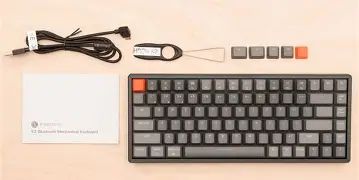
For people sensitive to acoustics: expect to tinker a little. The K2 V2 isn't badly tuned out of the box, but enthusiasts will see improvements with modest modifications.
Connectivity and battery life
The K2 V2 supports wireless pairing and wired USB-C use. In my day-to-day I leave it connected to my main workstation via Bluetooth and only plug it in when I want lower latency for a game session. The Bluetooth reconnection has been mostly reliable — it remembers paired devices and switches between them with a key combo — but there were a handful of times when reconnection felt sluggish and I had to toggle Bluetooth on my laptop to re-establish the link.
Battery life is strongly dependent on how you use the backlight. With modest usage (typing-heavy days, backlight off or low), I routinely got multiple days between charges—often about a week. With RGB lighting on at medium brightness and occasional gaming I would charge it roughly every 4–7 days. Those are my real-world numbers; your mileage will vary depending on brightness and use.
Customization, software, and firmware
The K2 V2 provides basic on-board customization: layers, hotkeys, and lighting presets. For deeper remapping or macro work I relied on the manufacturer's desktop utility. In my experience the software worked for everyday remapping and lighting tweaks, but it wasn't flawless: it occasionally felt clunky, and firmware updates required a cable connection (which makes sense) but were a little fussy the first time I ran them.
For people who like to program complex macros or use advanced configurators like QMK, the level of native openness depends on the exact variant you buy. My recommendation: if heavy firmware hacking is important to you, confirm the specific model's firmware support before buying.
Portability and ergonomics
I brought the K2 V2 with me on a few business trips. Its compact footprint and detachable USB-C cable make it fairly travel-friendly, and it fit neatly into my backpack without taking up much space. The front-to-back slope is comfortable for short to medium typing sessions; if you prefer a more pronounced angle, aftermarket feet or a desk riser may be needed.
Durability and long-term impressions
After six months of daily use, the K2 V2 held up well. Key legends didn't wear noticeably on my PBT replacement caps, and there were no connectivity failures. The only minor physical wear was a faint scuff on the case corner where it rubbed against other items in my bag—nothing structural. Overall, I felt confident using it as a daily driver.
Pros & Cons
- Pros:
- Compact 75% layout that balances size and functionality—arrow keys and function row retained.
- Hot-swap sockets make switch experimentation easy without soldering.
- Aluminum top-plate variant feels solid and produces a satisfying, denser sound after modest tuning.
- Good battery life in real-world use when you balance backlight brightness.
- Travel-friendly: detachable USB-C and compact footprint.
- Cons:
- Stock stabilizers are mediocre; I recommend lubing/clipping for a better feel.
- Software can be clunky and firmware updates require wired connection.
- Bluetooth reconnection can be inconsistent on some systems—occasionally sluggish.
- Stock keycaps on some variants are thin ABS and show shine over time; PBT replacements improve feel and sound.
How the K2 Version 2 compares (quick table)
| Feature | K2 Version 2 (my unit) | K2 Version 1 (my past unit) | Common Competitor (compact wireless 75%) |
|---|---|---|---|
| Layout | 75% / 84 keys — compact with arrows and function row | 75% — similar layout, slightly less refined finish | Varies — many offer 75% or 65%; 75% gives better arrow access |
| Connectivity | Bluetooth + wired USB-C; multi-device pairing | Bluetooth + wired; earlier Bluetooth stack sometimes less stable | Typically Bluetooth + USB-C; some add 2.4 GHz dongles |
| Hot-Swap | Yes — easy switch swaps | Some variants were hot-swap, others were soldered | Many competitors offer hot-swap on select SKUs |
| Sound / Typing | Denser, warmer with aluminum top plate; benefits from keycap/stab tuning | Brighter and a bit thinner; felt less refined | Varies widely; some are gasket-mounted for a softer feel |
| Software / Customization | On-board layers + desktop utility; firmware updates via cable | Basic remapping via shortcuts; software less mature | Competes on software; some offer QMK/VIA support for deeper customization |
| Battery (observed) | Several days to ~1 week with backlight on; longer with light off | Shorter unless backlight off; incremental improvements in V2 | Comparable; depends on battery capacity and lighting options |
Buying guide: who should consider the K2 V2?
In my experience the K2 Version 2 is a strong choice if you fall into one of these categories:
Find top-rated Electronics products at great prices.
See Deals →- Casual to power users who want a compact layout but still need arrows and F-keys. The 75% layout balances desk real estate and productivity.
- People who want to tinker. The hot-swap sockets make it easy to try different switches and optimize the feel without soldering.
- Travelers who want a dependable wireless keyboard. It's compact and reasonably robust for being tossed into a bag.
- Users who want a nicer stock acoustic profile without heavy modding. The aluminum top-plate variant sounds and feels better out of the box than some plastic options.
When to look elsewhere:
- If you want completely silent, factory-perfect stabilizers. The K2 V2 can reach that level after work (lube/clip) but not right out of the box.
- If you need absolute Bluetooth reliability across many devices without occasional reconnection hiccups. Some ultra-premium boards or those with a dedicated 2.4 GHz dongle will be more consistent in that respect.
- If you need full open-source firmware like QMK out of the box. Some competitors prioritize QMK/VIA support more explicitly—check the specific SKU.
Which variant to choose (my advice)
From my testing, if you care about sound and feel, opt for the aluminum top-plate variant and plan to replace the stock keycaps with PBT sets when possible. Choose hot-swap if you like experimenting with switches; it's the single most convenient feature for dialing in the keyboard's personality.
Tips before you buy
- Decide which switch type you prefer: tactile for feedback, linear for smoothness, or clicky if you love audible feedback. If uncertain, pick hot-swap so you can try multiple types.
- Plan to lube and clip stabilizers if you want a premium feel—it's a 30–60 minute job that makes a big difference.
- If you care about acoustics, budget for thicker PBT keycaps—these alter the sound and feel appreciably.
- Check the exact SKU's firmware support if you rely on QMK/VIA or need complex macro support.
- Test Bluetooth reconnection behavior with your primary devices if you can—some systems (especially certain laptop Bluetooth stacks) show quirks.
Final verdict: should you buy the K2 Version 2 in 2026?
After several months of daily use, my answer is: yes, with caveats. The K2 Version 2 is a strong all-around compact mechanical keyboard that improves on its predecessor in meaningful ways—better finishing, reliable hot-swap sockets, and a more pleasant raw sound on the aluminum-top variants. It's an especially good buy if you want a compact layout with arrows and function keys, and if you enjoy tweaking switches and keycaps.
That said, the K2 V2 isn't a perfect, out-of-the-box dream for enthusiasts who expect factory-perfect stabilizers and flawless Bluetooth behavior. If you want everything to be perfect without any tinkering, be prepared to make a few small upgrades or consider a premium board that targets audio and stabilization out of the box. For my workflow—writing, light gaming, and travel—the K2 V2 hits a sweet spot between price, portability, and customizability.
In my experience, buy the K2 V2 if you appreciate a compact, customizable keyboard and don't mind doing a couple of simple tweaks (lubing stabilizers, swapping keycaps) to get it sounding and feeling just right. If you're looking for absolute plug-and-play perfection with no room for tinkering, you may want to compare a few higher-end alternatives first.
My closing thought
I've enjoyed using the K2 V2. It grew on me: small, practical improvements added up to a more pleasant everyday tool. It's not perfect, but it's one of the most flexible compact options I've used in this price and feature bracket. If you're curious, consider the hot-swap aluminum variant and set aside an afternoon to tune it—the results are worth it.